Sections menu
Cessna 172S Skyhawk · Cockpit panel
Live cockpit panel
Click a switch, knob or pushbutton to move it. The panel on the right explains every position, and the lights at the top react like the real ones. Simplified teaching logic — not a certified simulator.
Left of the pilot's knees, below the PFD
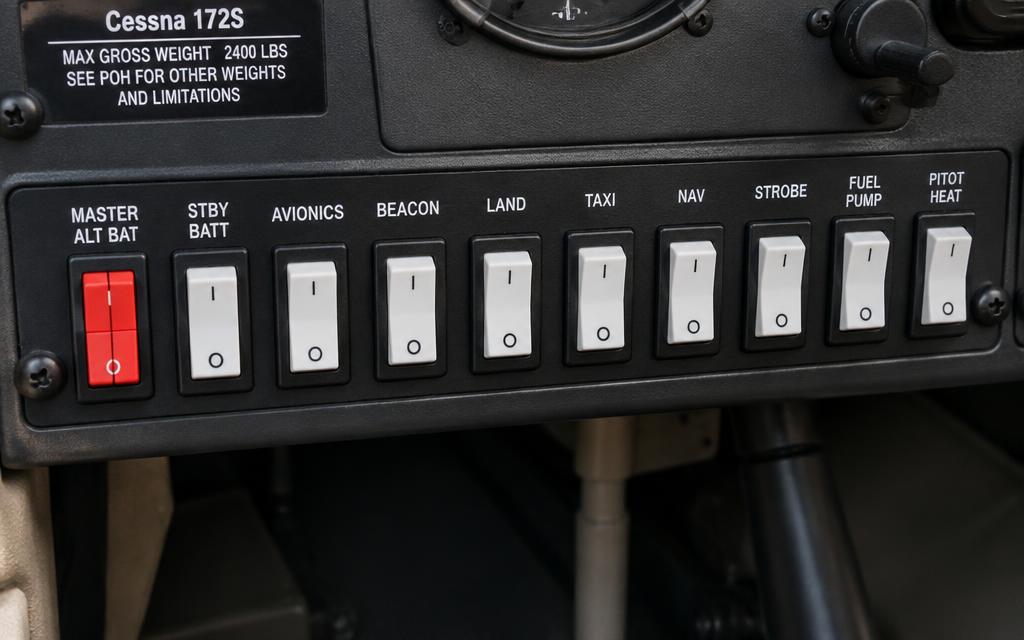
Lower switch panel & engine controls
Battery master, alternator, avionics buses, lights, magnetos and fuel. Start with everything OFF, then follow the order a real engine start uses.
Guided task
- 01Fuel selector BOTH.
- 02MASTER BAT ON — check bus voltage.
- 03BEACON ON.
- 04FUEL PUMP ON 3–5 s to prime, then OFF (mixture RICH, throttle 1/4 in).
- 05FUEL PUMP OFF.
- 06Clear prop! — MAGNETOS START, release to BOTH when it fires.
- 07MAGNETOS BOTH — oil pressure green within 30 s.
- 08MASTER ALT ON — ammeter shows charge.
- 09AVIONICS BUS 1 ON.
- 10AVIONICS BUS 2 ON.
The control for the next step pulses amber on the panel.
Master & avionics
Lights & pitot
Engine
Teaching logic: switch MAGNETOS to START with MASTER BAT on and FUEL SELECTOR not OFF to 'start' the engine.
EDUCATIONAL USE ONLY. Content is summarised from manufacturer documentation for learning. It is not approved flight or maintenance data. Always use the current, aircraft-specific POH/AFM, FCOM, QRH, AMM and operator procedures.